
iParkit Garage Parking
InterParkMaps & Navigation
4.4451.00 Reviews
- Version
- 4.3.20
- Installs
- 100.00K
- Age Rating
- Everyone
Screenshots
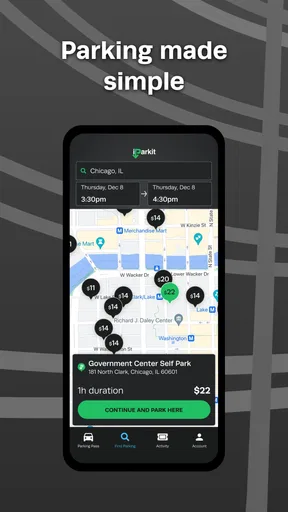
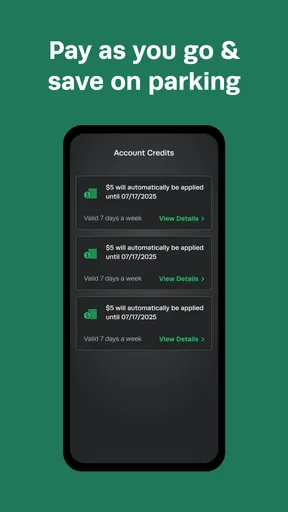
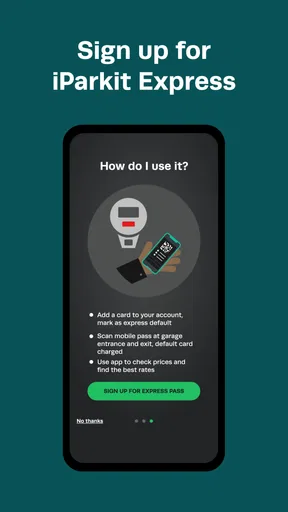
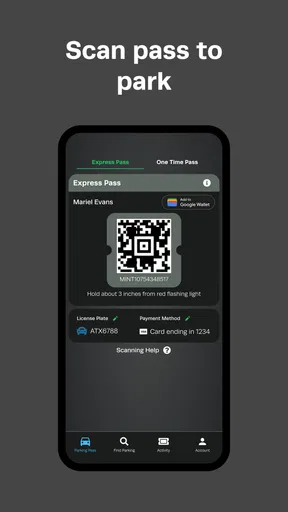
Our Review of iParkit Garage Parking
 Analysis by Appyee
Finding a place to leave a car downtown can turn a short trip into a frustrating search, especially when the street is busy and every minute behind the wheel adds stress. iParkit Garage Parking takes a focused approach to that problem: it is a Maps & Navigation app built around helping drivers deal with garage parking more easily. I found its appeal less in trying to replace every navigation tool and more in making the parking part of a city visit feel like a planned step instead of an afterthought.
The app is free, carries an Everyone age rating, and comes from InterPark. It has been available since March 31, 2016, and its current version is 4.3.20, with support for Android 7.0 and later. Those details matter because this is the kind of practical utility people often install before a particular outing, then keep available for the next downtown appointment, dinner, event, or shopping trip.
Why the garage-focused approach matters
Most people already have a general-purpose map app on their phone. That tool is usually excellent at getting a driver to a neighborhood or street, but the final parking decision can still be awkward. A map may show many nearby places without helping the driver think specifically about garage parking as the destination. iParkit Garage Parking narrows that task. Instead of treating parking as a small detail at the end of a route, it puts the garage search closer to the center of the experience.
That focus has a practical effect. When I am heading downtown, I do not really need another broad map full of unrelated businesses. I need to reduce the number of decisions I have to make after entering a crowded area. A dedicated parking app can help me start with the question that actually matters: which garage should I consider before I get close enough to begin circling?
This is the app’s most useful capability and the one I would pay attention to first. It is not simply about displaying a location. It changes the order of the trip. I can think about parking before the last few turns, rather than reaching the destination and hoping a suitable space appears nearby. That shift is small, but it can make a noticeable difference when traffic is heavy or the schedule is tight.
In my experience, the value is strongest for people who visit the same urban areas occasionally but do not know their parking layout well. A local commuter may already have a routine, while a visitor may not know which garage is convenient for a particular block. The app makes more sense for the second group, as well as for anyone who prefers a garage to searching for street parking.
Using it before the drive begins
The best workflow starts before I pull away. I first decide where I am actually going, then use the parking-focused view to consider a garage near that destination. This is more useful than opening a parking app only after arriving, because the final approach is often the worst time to compare options. Once I am in dense traffic, even a simple change of plan can be distracting.
A helpful habit is to choose a parking target and a backup before leaving. The first choice may be closest to the meeting point, while the second can be a reasonable alternative if the approach is inconvenient. This is one of the less obvious advantages of a specialized parking tool: it encourages a decision before the pressure of downtown driving takes over. I would still check the route in my usual navigation app if I need detailed traffic guidance, but I would use iParkit Garage Parking to shape the parking plan.
That division of labor is important. A dedicated parking app does not need to replace a full navigation service to be useful. General map apps remain better suited to a complete journey across town, live traffic context, and broad place searches. iParkit Garage Parking is more valuable at the point where “take me downtown” becomes “where should I leave the car?”
For a first-time user, I would avoid experimenting while moving. Set the destination and review the available parking choices while stopped or before starting. The app’s purpose is to remove uncertainty, not create another screen to manage during a complicated turn. Preparing early also gives me time to notice whether the selected garage is actually sensible for the destination, rather than assuming the nearest marker is automatically the best one.
A realistic downtown trip
Imagine I have an evening appointment in a busy central district. I know the building I need, but I do not know the surrounding garages, and I do not want to spend ten minutes driving around looking for an entrance. Before leaving, I open the app, search around the destination, and choose a garage that appears practical for the final walk. I keep a second option in mind in case the first approach is awkward.
When I get close, I am no longer making a completely open-ended decision. I am following a parking plan. That reduces the temptation to stop at the first uncertain location or make repeated loops through crowded streets. After parking, the remaining journey is on foot, so the garage’s relationship to the destination matters just as much as its position on the map. This is where a parking-specific mindset helps: the goal is not merely to find any place to leave the car, but to make the whole arrival less chaotic.
The same workflow works for a daytime appointment, a shopping trip, or an event where arriving late would be especially inconvenient. It is also useful when traveling with someone who cannot comfortably wait while the driver searches. Having a garage in mind makes the arrival more predictable and can prevent the familiar argument about whether to keep circling or park farther away.
I would also use this approach when visiting an unfamiliar downtown area for the first time. Even if I ultimately choose a different garage, reviewing the local parking options in advance gives me a rough mental map. That preparation is more valuable than it sounds. It means I am less likely to confuse a nearby destination with a nearby entrance, and it gives me a fallback if the preferred option does not suit the moment.
Where the convenience has limits
The garage-centered design is also the main limitation. If I am looking for street parking, a large general map application may be more appropriate. If I need a full door-to-door route with extensive traffic information, I would still rely on a broader navigation service. iParkit Garage Parking makes the most sense when the parking location itself is the problem to solve.
I would not treat a map marker as a guarantee that a space will be available when I arrive. Parking conditions can change quickly, particularly during busy periods. A garage may be convenient on the map but less convenient from the direction I am approaching, and a short walking distance does not always tell the whole story for someone carrying equipment, traveling with children, or dealing with limited mobility. The app can support the decision, but I still need ordinary judgment about timing, access, and the destination’s real entrance.
Another trade-off is that a focused parking tool may require me to switch between apps. I might use iParkit Garage Parking to identify a garage, then use my regular navigation app for the drive. That is not a serious flaw, but it is worth knowing before expecting one application to handle every stage. For me, the extra step is reasonable when parking is the difficult part, but someone who wants a single all-purpose map may prefer to stay inside one familiar service.
I also think the app is less compelling for people who rarely drive downtown or who already know a reliable garage near every destination they visit. In that situation, the parking problem has already been solved through habit. The app becomes more useful when the destination changes, the area is unfamiliar, or the driver wants to compare the parking possibilities before committing to a route.
Small decisions that improve the experience
One practical tip is to search from the destination outward rather than choosing a garage first and hoping it is close enough. The walking relationship should guide the choice. A garage that looks attractive in isolation may leave me on the wrong side of a large block, while another slightly farther away may make the final walk simpler. This is especially important when I am meeting someone at a specific entrance rather than merely visiting a general neighborhood.
A second tip is to make the parking decision part of the itinerary. If I have an appointment time, I should allow room not only for the drive but also for entering the garage, parking, walking, and finding the final building entrance. A parking app can reduce searching, but it cannot remove those real-world steps. Planning them together prevents the common mistake of treating arrival at the garage as arrival at the destination.
A third useful habit is to keep a backup choice without overloading myself with options. Comparing every possible garage can become another form of indecision. I would select one preferred option based on destination convenience and one fallback that is easy to reach. That gives me flexibility without encouraging last-minute screen use in traffic.
Finally, I would review the plan while the phone is still easy to use. Enter the destination before driving, look at the parking choices while stationary, and let the app do its job as a preparation tool. The benefit comes from reducing mental workload on the road, not from constantly checking the display while moving.
What the app is like as a long-term utility
The app has earned a 4.4 average from around 3.5 thousand ratings, with more than 100 thousand installs. I read that level of adoption as a sign that the focused idea has found a real audience, especially among drivers who regularly face downtown parking decisions. It is not trying to be an entertainment app or a broad travel platform; its usefulness depends on whether its parking information fits the places I actually visit.
Because it is free, trying it carries little commitment. That makes it easy to install before a trip and decide whether it fits my routine. The main question is not the cost but the match between the app’s focus and my needs. If I want garage planning, it has a clear purpose. If I want a complete navigation replacement, I would look elsewhere or use it alongside another tool.
The Everyone rating also makes it suitable for a wide range of drivers and passengers to use as a planning aid. Still, the person operating the vehicle should handle the interaction safely. I would prepare the search in advance or ask a passenger to manage it, rather than trying to compare garages while navigating busy streets.
InterPark’s role as the developer is relevant here because the app feels centered on a specific parking use rather than a general collection of unrelated travel functions. That specialization can be a strength. It gives the app a clear job, and clear jobs are easier to judge: after using it, I can tell whether it helped me approach downtown parking with a better plan.
Who benefits most from this focused tool
I would recommend it most to occasional downtown drivers, visitors attending appointments, and people who dislike the uncertainty of searching for a garage at the last moment. It is particularly useful when the destination is familiar but the parking around it is not. Someone who drives into central areas only a few times a month can use it as a preparation step without needing to memorize local garages.
It can also help families and passengers who value a predictable arrival. Choosing a garage before the trip makes it easier to estimate the remaining walk and avoid unnecessary loops. For work appointments, that planning can be the difference between arriving calmly and walking in already rushed.
I would be more cautious about recommending it to someone who primarily parks on residential streets, needs comprehensive live traffic guidance, or already has a trusted all-in-one navigation routine. In those cases, a general map app may be faster and more familiar. The focused design is not a weakness by itself; it simply means the app should be judged as a parking companion, not as a universal replacement for every navigation tool.
My recommendation after using it
iParkit Garage Parking succeeds because it addresses a narrow but common moment in city driving: deciding where the car should go before the final approach becomes stressful. I like the way that focus encourages advance planning, a primary garage choice, and a realistic backup. It does not eliminate the need to think about access, walking distance, timing, or availability, but it can make those decisions earlier and more deliberately.
For me, the best setup is to use it before leaving, choose parking around the actual destination, and rely on a broader navigation app for the main drive when necessary. That combination respects what each tool does well. The app is free, straightforward in purpose, and worth trying if downtown garage parking is a recurring headache. It is not the right choice for every driver, but for the person who wants to replace aimless circling with a simple parking plan, it is a useful addition to a phone.
Verdict
Strengths of iParkit Garage Parking
- Find and reserve parking spaces before arriving.
- Useful location details help compare nearby garages.
- Reservation options can reduce time spent searching.
- Supports cashless payment for a more convenient exit.
- Helpful for planning parking in busy urban areas.
Limitations of iParkit Garage Parking
- Coverage may be limited depending on your city.
- Prices and availability can change during peak periods.
- Some reservations may include cancellation restrictions.
- App performance depends on GPS and mobile connectivity.
- Garage rules and access hours may vary by location.
Similar Picks in This Category
View All
Uber - Request a ride
Uber Technologies, Inc.4.7


inDrive. Rides with fair fares
® SUOL INNOVATIONS LTD4.8

Yandex Go: Taxi Food Delivery
Mikromobilnost LLC Belgrade4.8

Bolt: Request a Ride
Bolt Technology4.8

Rapido: Bike-Taxi, Auto & Cabs
Rapido Bike Taxi4.8
Frequently Asked Questions
What is iParkit Garage Parking, and how does it work?
iParkit Garage Parking is a parking app designed to help drivers find and use participating parking garages more conveniently. After opening the app, you can search for available locations, review garage details, and follow the instructions for entering and exiting. Depending on the facility, the app may also support reservations, digital payment, parking session management, and access through a mobile device.
Can I reserve a parking space in advance with iParkit Garage Parking?
In supported garages, iParkit may allow you to reserve parking before arriving, which can be useful when visiting busy downtown areas, airports, event venues, or offices. Availability, reservation options, prices, and cancellation conditions can vary by location. Before confirming a booking, check the selected garage, entry time, parking duration, restrictions, and any additional service or convenience fees.
How do payments work in the iParkit Garage Parking app?
Payment is generally handled through the app using a supported payment method, such as a debit card, credit card, or another option made available in your region. You should review the final price before starting or confirming a parking session because rates can depend on the garage, time, event demand, and parking duration. Always keep your confirmation or receipt for reference.
Does iParkit Garage Parking work at every parking garage?
No. iParkit Garage Parking is intended for participating facilities rather than every garage in a city. The available locations, features, access methods, and operating hours depend on the garage operator and local coverage. Before driving to a listed location, review its address, height restrictions, vehicle requirements, opening times, and instructions to make sure it suits your car and parking needs.
What should I do if I have trouble entering, exiting, or ending my parking session?
If the gate does not open, your reservation is not recognized, or the app fails to end a session, first check your internet connection and confirm that you are using the correct account or booking. Follow the garage’s posted assistance instructions or use the intercom at the entrance or exit. Keep your booking details, payment receipt, and vehicle information available when contacting support.
